glTF
glTF is an API-neutral runtime asset delivery format. glTF bridges the gap between 3D content creation tools and modern graphics applications by providing an efficient, extensible, interoperable format for the transmission and loading of 3D content.
Overview
A glTF is a json file that contains information about 3D object(s), this can contain scenes, nodes, animations, geometries and more.
Structure
There are many information types:
Scene
A scene contains its name and a list of node indices.
The default scene is defined in the scene property.
{
    "scene": 0,
    "scenes": [
        {
            "name": "Root Scene",
            "nodes": [0, 1, 2, 3]
        }
    ]
}
Node
Can refer to other nodes with the children property, which contains node
indices. A node can refer to a mesh or a camera, and carries its local
transform. A node also contains its name.
The local transform is expressed either as a matrix, or as the
translation / rotation / scale triple — never both. The rotation is a
quaternion [x, y, z, w], and the matrix built from the triple is
M = T * R * S.
{
    "nodes": [
        {
            "name": "TRS Node",
            "children": [1, 2, 3],
            "translation": [1.0, 2.0, 2.5], // length must be 3
            "rotation": [0.0, 0.0, 0.0, 1.0], // length must be 4, normalized
            "scale": [1.6, 3.9, 2.7], // length must be 3
            "mesh": 27,
            "camera": 0
        },
        {
            "name": "Matrix Node", // must not also carry translation/rotation/scale
            "matrix": [
                -0.99975, -0.00679829, 0.0213218, 0, 0.00167596, 0.927325,
                0.374254, 0, -0.0223165, 0.374196, -0.927081, 0, -0.0115543,
                0.194711, -0.478297, 1
            ] // length must be 16, column-major
        }
    ]
}
Every one of those properties is optional. An absent transform property means
its identity value, and an absent mesh / camera / skin means the node
simply has none — the key is omitted, it is never written as -1.
Mesh
A mesh refers to a list of primitives, plus the name of the mesh. A primitive is basic geometry like a point, line, or triangle. Each primitive has:
- rendering
mode: constant indicating how it should be rendered. indices: accessor index to retrieve the index data.attributes: contains all the accessor indices to retrieve mesh information.material: the material index.
mode | Primitive |
|---|---|
0 | POINTS |
1 | LINES |
2 | LINE_LOOP |
3 | LINE_STRIP |
4 | TRIANGLES |
5 | TRIANGLE_STRIP |
6 | TRIANGLE_FAN |
mode defaults to 4 (TRIANGLES) when absent.
{
    "meshes": [
        {
            "primitives": [
                {
                    "attributes": {
                        "NORMAL": 23,
                        "POSITION": 22,
                        "TANGENT": 24,
                        "TEXCOORD_0": 25
                    },
                    "indices": 21,
                    "material": 3,
                    "mode": 4
                }
            ]
        }
    ]
}
Accessor
An accessor is an object that describes how to read typed data out of a buffer view — it is what meshes, skins and animations point at. This object contains:
bufferView: the index of the buffer view.byteOffset: the offset of our data, relative to the buffer view. The real offset into the buffer isbufferView.byteOffset + accessor.byteOffset.componentType: the type of one component, table of types below:
componentType | Data Type | Signed | Bits |
|---|---|---|---|
5120 | signed byte | Signed, two’s complement | 8 |
5121 | unsigned byte | Unsigned | 8 |
5122 | signed short | Signed, two’s complement | 16 |
5123 | unsigned short | Unsigned | 16 |
5125 | unsigned int | Unsigned | 32 |
5126 | float | Signed | 32 |
5124 (signed int) is missing on purpose: it is not a legal glTF 2.0
componentType.
count: number of elements — not bytes, and not components. AVEC3accessor withcount: 2399holds 2399 vectors, so 7197 floats.type: the shape of one element, and therefore how many components it has:
type | Components |
|---|---|
SCALAR | 1 |
VEC2 | 2 |
VEC3 | 3 |
VEC4 | 4 |
MAT2 | 4 |
MAT3 | 9 |
MAT4 | 16 |
max/min: per-component bounds of the data, so both arrays are as long as the element has components. Required for thePOSITIONattribute — that is where the bounding box comes from — and optional everywhere else.
{
    "accessors": [
        {
            "bufferView": 0,
            "byteOffset": 0,
            "componentType": 5123,
            "count": 12636,
            "max": [4212],
            "min": [0],
            "type": "SCALAR"
        },
        {
            "bufferView": 1,
            "byteOffset": 0,
            "componentType": 5126,
            "count": 2399,
            "max": [0.961799, 1.6397, 0.539252],
            "min": [-0.692985, 0.0992937, -0.613282],
            "type": "VEC3"
        }
    ]
}
BufferView
A buffer view is a window onto a slice of a buffer: byteLength bytes starting
at byteOffset, inside the buffer at index buffer.
byteStride: how many bytes to step from one element to the next. Absent means the data is tightly packed and the step is the element size. Present means the data is interleaved — several attributes share the same window and each one walks it with the same stride but a different starting offset.target: hints what the data is for,34962(ARRAY_BUFFER, vertex attributes) or34963(ELEMENT_ARRAY_BUFFER, indices).
{
    "bufferViews": [
        {
            "buffer": 0,
            "byteLength": 512,
            "byteOffset": 0,
            "byteStride": 32,
            "target": 34962
        }
    ]
}
Buffer
A buffer is raw data of byteLength bytes. The uri points at a .bin file or
holds a data-uri; in a .glb the uri is absent and the data is the BIN chunk.
{
    "buffers": [
        {
            "byteLength": 102040,
            "uri": "duck.bin"
        }
    ]
}
Why we have accessor, buffer view and buffer
So why do we have those three, why not only one or two of them ?
The buffer is a single resource to fetch (.bin, data-uri, BIN chunk of a
.glb). One download.
The buffer view exists so that one download can hold several GPU objects: each
view carves out the slice that becomes one GPU buffer, with its own target and
its own stride.
The accessor exists because the same bytes still have to be read as something —
2399 VEC3 of floats, or 12636 SCALAR of unsigned shorts. It is the only
level that knows the type, and that is why interleaving works: several accessors
can point at the same view with different byteOffset and the same
byteStride.
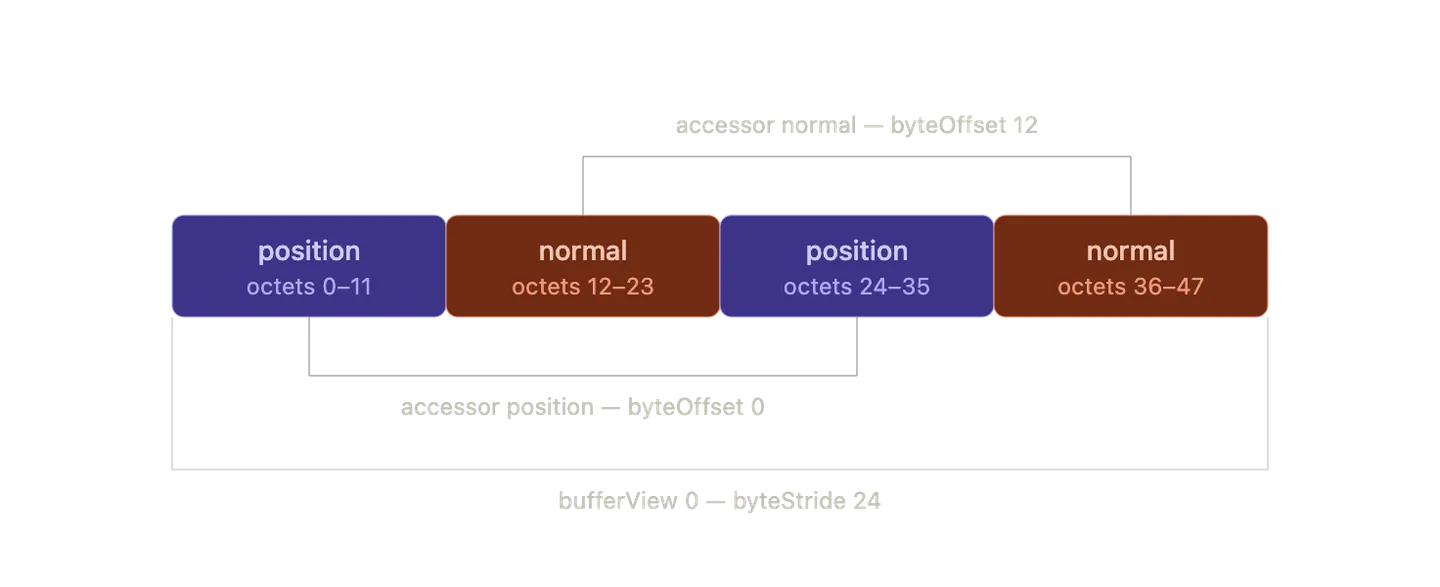 glTF 2.0 - interleaved bufferview stride offset
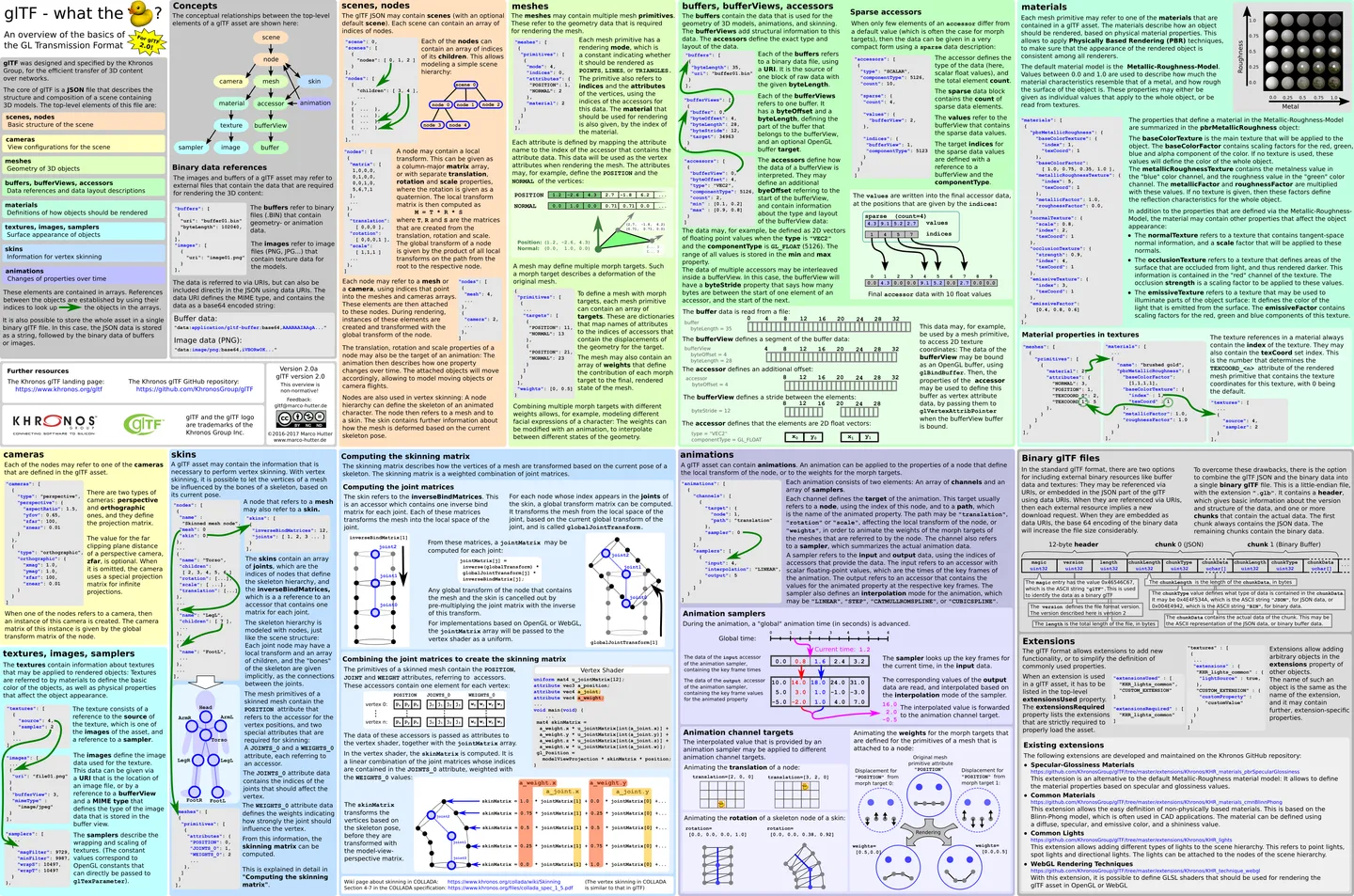 glTF 2.0 - What the duck ?
Material
glTF defines materials using a common set of parametres that are based on widely used material representations from Physically Based Rendering (PBR).
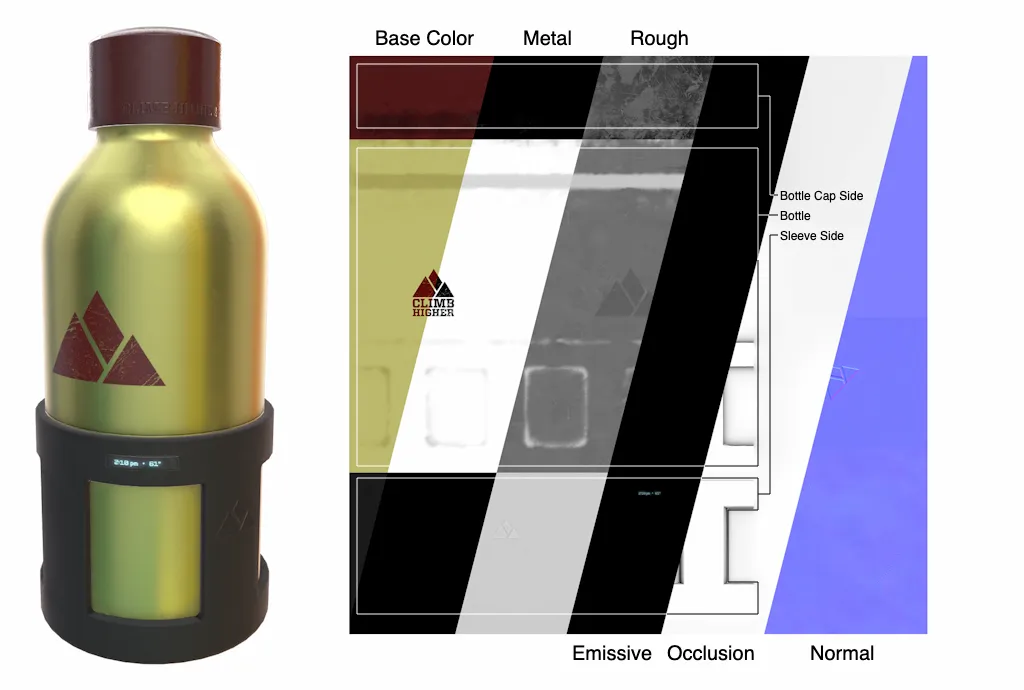 glTF 2.0 - Physically Based Rendering Example
{
    "materials": [
        {
            "name": "gold",
            "pbrMetallicRoughness": {
                "baseColorFactor": [1.0, 0.766, 0.336, 1.0],
                "metallicFactor": 1.0,
                "roughnessFactor": 0.0
            }
        },
        {
            "pbrMetallicRoughness": {
                "baseColorTexture": {
                    "index": 0,
                    "texCoord": 1
                }
            }
        }
    ]
}baseColorFactor: base color of the material.baseColorTexture: hold the index of the terture
Process a node
- Node: process node (local transform, world transform, quaternion)
- Children: process node
Resources
Add to note
- Materials, textures, samplers, images.
- The GLB container (header, JSON chunk, BIN chunk).
- Animations and skins.
- Sparse accessors,
normalized, extensions.